The assistant is now rate limited to stop spamming
v3.2
Switch between a fast text model and one that reads images and files
Attach photos, CSV or text files to a question
Each reply shows which model answered and the tokens used
Each chat remembers its model
Tidier header: just your picture and name, click for your profile
v3.1
Profile panel: tap your avatar to set a photo, colour, name, password or email
Fixed admin rights so the Users and guest tab controls show properly
Admin shortcut added in Settings
v3.0
Ask AI: a helper that knows the admin work, with saved chats
Guides and Notes merged, editable from the web by admins
Roles: developer, vet (admin) and guest
Users tab: see staff, roles, login times, and guest sign-ins
Admins choose which tabs guests see
Guests enter a name and email to view
Herd list flags short or odd K/UK tags to double-check
v2.1
60 days between tests, works from either date
Calf: 42 days from date of birth
Rabies: 21 days from vaccination
Each result shows the day either side so you can see the boundary
v2.0
Real accounts: public access code or staff login
Staff sign up with an invite code
Your notes, notepad and filing now sync across devices
Sign out from the top right
v1.9
Filing helper: A-Z drawer finder with farm-name handling
Guides tab: TB, SAM, Teleos and filing walkthroughs
Search on notes and notepad
Pin notepad entries; export notepad to a file
Copy summary button on the herd tool
v1.8
Notepad tab for quick saved notes
Contact George opens a popup with email bubbles
Themes now recolour borders, glow, background and the logo !
Separate on/off for the floating ! marks
Browser tab shows the logo and "Castle House - Vet Tools"
Extra accent colour (amber)
v1.7
Only the logo opens the About popup
Contact George: reveals a list of emails
Bordered, labelled button groups and counts
More settings: accent colour, density, background toggle
Livelier animated background
v1.6
Animated unlock: logo spins, brightens, doors open
Tab hover is now clearly highlighted
Emails shown capitalised
v1.5
Company logo in header, tabs, About and login
Notes now sorted into categories with filter tabs
Assign a category when adding a note
Footer with contact emails
Moving background restored on the login page
v1.4
Version pill moved into the header
iPhone layout and touch support
Click the logo for an About popup
Cleaner note titles
v1.3
Version pill and changelog
Settings tab: glowing borders toggle, in whichever accent colour is picked
Reset buttons on the date tracker
v1.2
Test Date Tracker (Tool 2)
Full glossary of TB test types in Notes
Removed em dashes and arrows
v1.1
Password gate, tabs, per-row copy
Duplicate flagging, B/V batch boxes
Help & Notes with saved notes
v1.0
First herd list processor
Castle House Veterinary Practice
Castle House - Vet Tools
✦ v7.9
Herd List
Test Date Tracker
Filing
Guides & Notes
Ask AI
Shared media
My documents
Website updates
Practice details
Team
Partners
History
Users
Inbox
Cow list processor
Paste your raw list, pull out the UK numbers, spot duplicates, and tag each one. Valued rows get boxes for the two tuberculin batch numbers.
1 · Paste raw list
Picks up anything starting “UK” followed by digits. Dates and status lines are ignored. Repeats are kept and flagged Duplicate so you can see them, not silently dropped.
2 · Tag results
Counts
0 total0 valued0 clear0 dup0 untagged
Show
Select
Tag
Bulk
!
Nothing yet. Paste a list and hit Extract.
Each row has its own Copy button. Valued = red = needs editing (with B/V batch boxes). Clear = green. Click rows to select; Shift-click for a range.
Test date tracker
A quick reference for the dates that matter. SAM does its own tracking, this is just a fast desk-side check so you can answer a farmer on the phone without logging in.
72-hour read window
Enter the day the OV injected. It shows the read day (about 72 hours later).
Pre-movement validity
Enter the pre-movement test date to see a rough guide to how long the clear result covers. Always confirm the exact window against current rules, this is a reminder, not the rulebook.
60 days between tests
Works either way round. Put in the first test date to get the date 60 days on, or put in the second date to get the 60 days before it.
Calf: 42 days from birth
Enter the calf's date of birth and it shows the date 42 days on.
Rabies: 21 days
Enter the vaccination date and it shows the date 21 days on.
Filing helper
Type a client's surname (and farm name if you have it). It tells you which drawer it goes in and shows exactly where it slots against everything else you've added. Common surnames automatically file by farm name.
Add a file
Common surnames that file by farm name
These file under the farm name instead of the surname. Edit the list if your practice uses different ones.
Filed order
0 filed
!
Add a name to see where it files.
Sorted letter by letter, so Abbey comes before Adams. The drawer letter is what matters for filing; the rest shows the exact order within that drawer.
Guides & Notes
Step-by-step walkthroughs, reference notes, and your own scratch pad.
Jot something down
Each entry is timestamped and saved to your account.
Saved
Media
Tutorial pages with videos, photos and notes. Pick one on the left to open it.
!
Pick a page on the left to view it.
Ask AI
A helper that knows about the practice's admin work. Ask how to do something, or paste a question. It keeps your past chats.
Fast. Text questions only.
!
Ask me anything about the admin work. For anything clinical, always confirm with a vet.
Users
Everyone with a staff account, their role, and when they last signed in. Guests who entered their details are listed below too.
Staff accounts
!
Loading...
Guest sign-ins
People who entered a name and email to view the guest page. Email is stored for your records only.
!
Loading...
Guest access codes
Codes people type when creating a guest account. Give a different code to each group, then you can stop new sign-ups on one code, or pause everyone who joined with it, without touching anyone else. Press People to see who used a code.
Loading...
What guests can see
Tick the tabs a guest sees. Settings is always available so they can change how the app looks for them.
What they can see
Website updates
Notices on the Updates page of castlehouse.vet. Newest at the top of the list unless you change the order.
Notices
Loading...
Practice details
Phone numbers, email and opening times shown on the website. Save and the website picks them up straight away, no redeploy.
Anything set to on or off switches a part of the website. The banner shows one line across the top of every page, for a bank holiday, a closure or an outbreak.
Loading...
Press Escape to close.
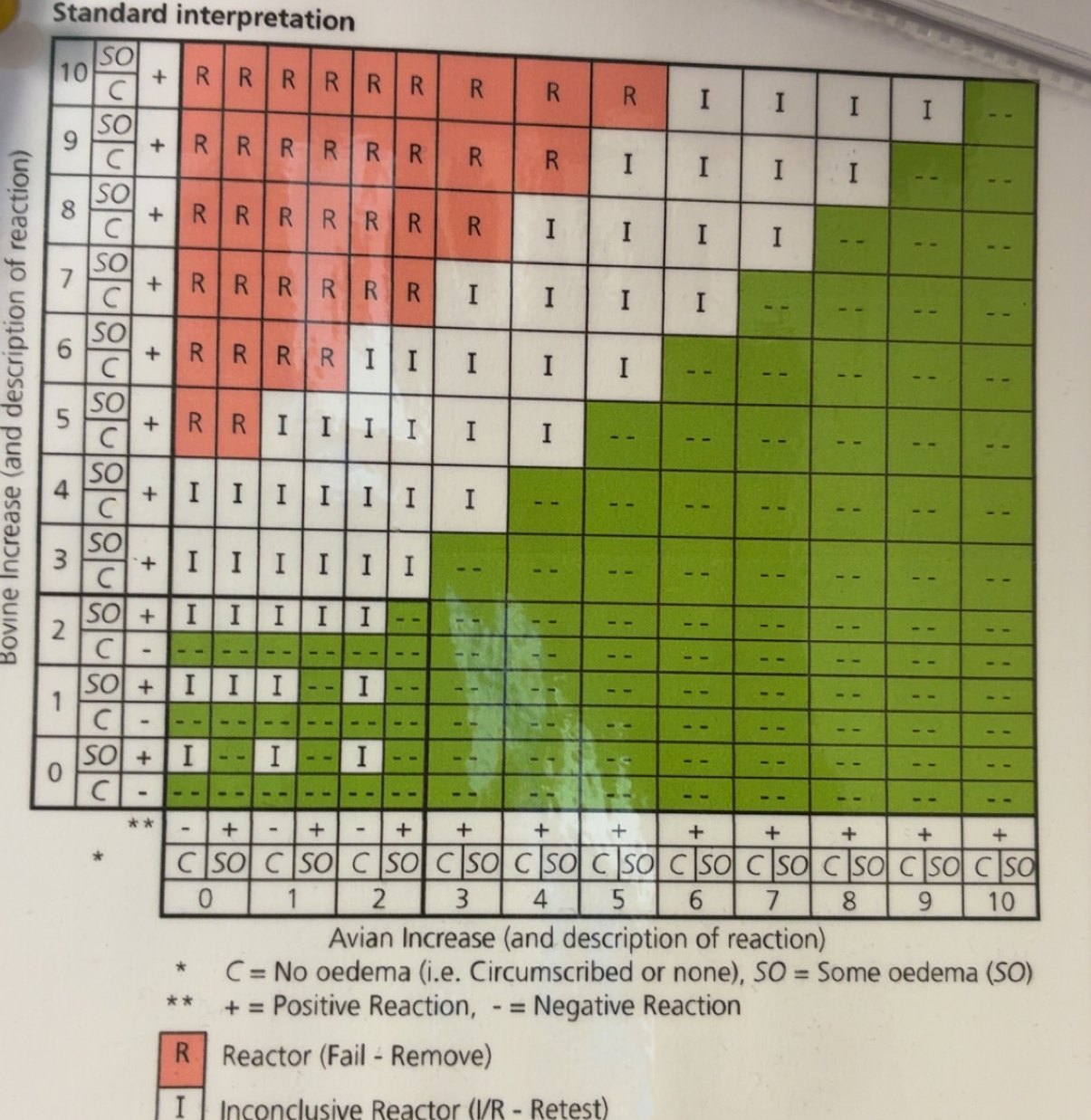
Standard interpretation
TB 64(W) Rev 7/06
Always check against the chart before you record anything.
This is a copy of the laminated chart typed into the app. It is a second
pair of eyes, not the authority. The chart in the practice is.
Drifting animalsThe drifting ! marks in the background.
Accent colourColours the buttons, links and the glow around the edge of boxes. It does not change the green theme itself.
DensityComfortable spacing, or compact to fit more on screen.
FontPick the typeface used across the app.
Text sizeMake everything a bit bigger or smaller.
BackgroundThe page behind everything.
Text colourHandy if you find the default hard to read.
Reset preferencesPut all look and feel settings back to default.
Intelligent Integrations
Castle House helps businesses work more efficiently. We look at the fiddly, repetitive parts of a job and find ways to make them easier, often adding one small step that takes away five.
Sometimes that means connecting tools that should already talk to each other, sometimes it is a simple utility that saves people clicking through the same task over and over. Either way the goal is the same: less friction, less busywork, more time on what actually matters.
One step in, five steps out.
⚙
Add text
Edit
Passwords cannot be set here. Use "Reset password" to email the person a reset link.
 Open the chart full size